SDP vs. VPN: Which solution is right for your organization?


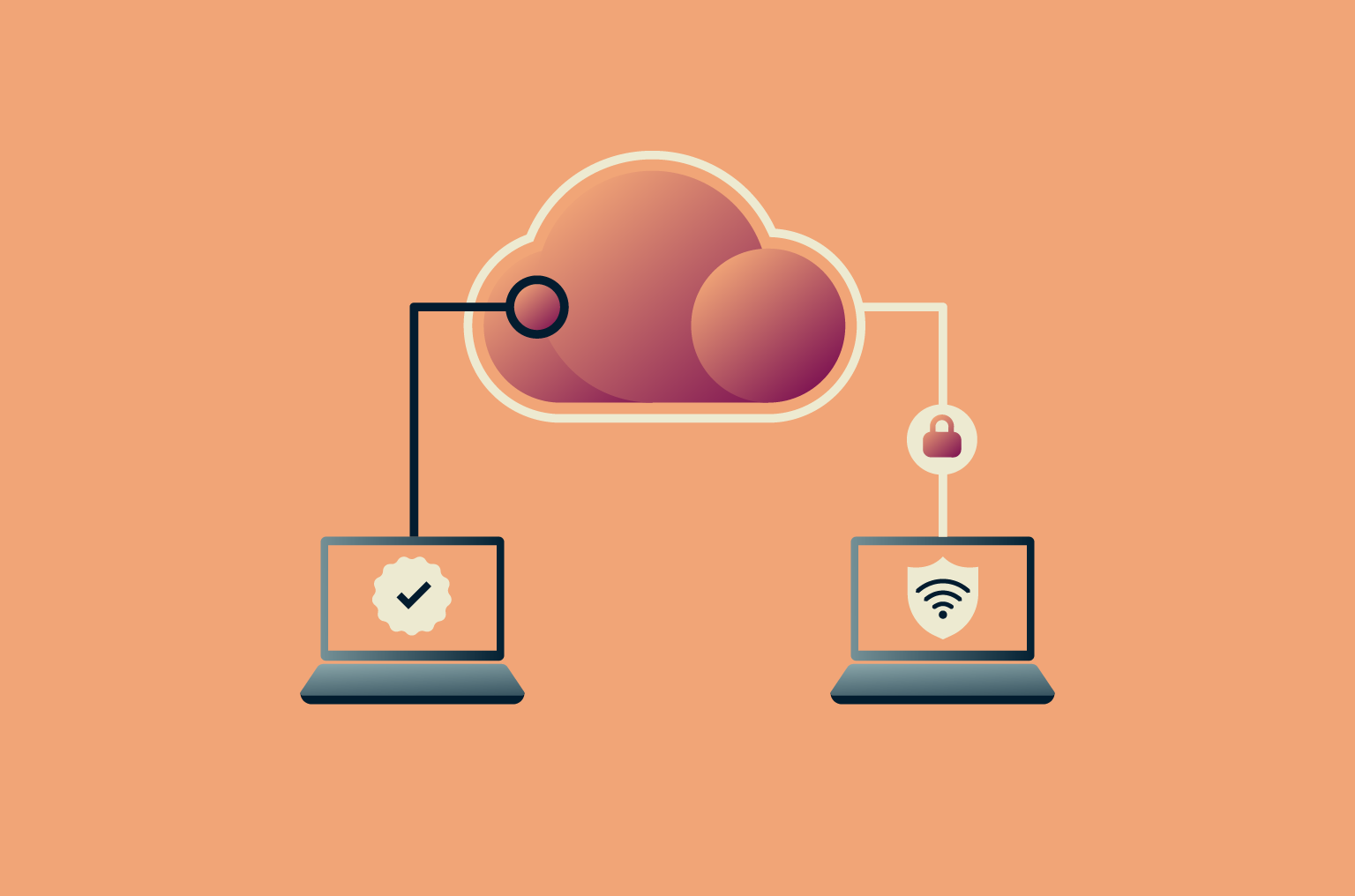
As organizations grow and adopt remote or hybrid work, securing network access becomes more complex. Many rely on corporate virtual private networks (VPNs) to connect employees safely, but software-defined perimeter (SDP) solutions are emerging as an alternative. Both technologies aim to protect sensitive data and control access to company resources, yet they differ greatly in approach, scalability, and threat mitigation.
This guide explores how SDP and VPNs work, their advantages and drawbacks, and when each is most effective in strengthening your network security and supporting your business goals.
What is a software-defined perimeter (SDP)?
An SDP is a security framework that controls who can access your organization’s systems and data. It works by making network resources invisible by default.
In an SDP, only verified users and trusted devices can connect, and even then, they’re given access only to the specific apps or services they’re authorized to use, while the rest of the network remains hidden. This model aligns with the “zero trust” approach, which assumes that no one, inside or outside the organization, should be trusted automatically.
Key components of an SDP
An SDP has four main components:
- Controller: Manages all access requests by verifying identity, evaluating security policies, checking device posture and context, issuing short-lived certificates, and performing continuous verification throughout the session to ensure trust remains intact.
- Gateway: Establishes an encrypted connection between the user and the specific resource once that user is approved. Gateways enforce micro-segmented access, meaning each user’s connection is isolated and limited only to the approved app or service.
- Client: Installed on the user’s device, the client initiates the connection by requesting access from the controller. It provides the user’s authentication details and device information and works with the gateway to establish a secure connection.
- Authentication providers: External systems that verify a user’s identity before the controller grants access. They handle the login process, often support multi-factor authentication (MFA), and commonly integrate with standards such as single sign-on (SSO), Security Assertion Markup Language (SAML), OpenID Connect (OIDC), and OAuth 2.0 (OAuth).
How an SDP implementation works
When a user tries to access a company resource, the SDP network first verifies their identity using factors like login credentials, device information, and location. If the request is approved, the gateway sets up a secure connection only to the specific resource that the user needs. Here’s how that looks in practice:
- Connection request: The user opens the SDP client on their device and requests access to a resource. The client sends identity details and device context to the controller.
- Identity and device verification: The controller checks the user’s login credentials and confirms the device’s status, such as operating system or security posture.
- Authorization and policy evaluation: The controller compares the request against internal access policies. It decides whether the user is allowed to reach the requested resource, based on factors like role, location, or device trust level.
- Secure session established: If approved, the client and the gateway establish an encrypted session. The gateway connects the user only to the specific application or service they are authorized to use.
The controller and gateway keep watching the session for changes in risk, such as unusual behavior or device state shifts. If something changes, access can be adjusted or revoked.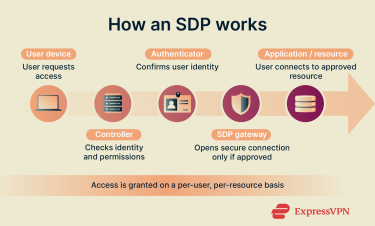
Advantages and limitations of an SDP
While SDP offers a modern, secure approach to controlling network access, it also introduces new challenges that organizations should weigh before adoption.
Benefits of using an SDP
- Enhances security: SDP conceals network infrastructure, making it invisible to unauthorized users and reducing exposure to cyberthreats.
- Improves access control: Access can be adjusted dynamically based on user behavior, device health, or location, ensuring that only verified users reach sensitive resources.
- Strengthens online security: By using identity-based access, SDP ensures that only verified users and devices can connect.
- Supports hybrid cloud: SDP integrates with hybrid cloud storage and applications, enabling secure access from any location without exposing the entire network.
- Ensures consistent control: Administrators can enforce access policies and encryption consistently across multiple cloud environments, maintaining security at scale.
Challenges and drawbacks
- Deployment complexity: Setting up SDP can be more complex than traditional network systems, requiring careful planning and configuration.
- Legacy system updates: Older applications or systems may need upgrades or modifications to work smoothly with SDP frameworks.
- IT training needs: IT teams often need additional training to manage SDP policies, user access, and troubleshooting effectively.
- Transition costs: Moving from VPNs or other access solutions to SDP can involve both time and financial investment.
- Implementation effort: Initial deployment demands significant planning, testing, and coordination to ensure smooth integration with existing infrastructure.
What is a corporate virtual private network (VPN)?
A corporate VPN is a tool that allows employees to connect to an organization’s internal network remotely. It creates a secure, encrypted connection between the employee’s device and the company’s servers, keeping data private while it travels over the internet.
Corporate VPNs play a key role in an enterprise security architecture. They’re widely used to give remote or traveling workers safe access to internal applications, files, and systems, just as if they were working in the office.
Key components of a corporate VPN
A corporate VPN typically includes three main components:
- Client: The VPN client is software installed on your laptop, phone, or desktop. It initiates the connection and handles the authentication process, typically by presenting credentials, certificates, or other identity information. It also encrypts and decrypts your data as you work, so everything you send or receive is protected.
- Server: A VPN server is a secure system that’s part of the company’s network (or cloud). It verifies your identity, checks whether you’re allowed to access internal resources, and establishes an encrypted link if approved. In many setups, the server also logs connection events for auditing and compliance.
- Tunneling protocols: These define how data is encapsulated, transported, and secured across untrusted networks. In corporate environments, protocols include IPsec, WireGuard, and OpenVPN. The chosen protocol affects how fast your connection feels and how well it performs across different networks.
- Encryption algorithms: These decide how the actual data is secured while traveling through the tunnel. Encryption scrambles your data so that even if traffic is intercepted, it can’t be read. Using strong encryption helps protect company information from surveillance, cyberattacks, and accidental exposure.
How corporate VPNs work
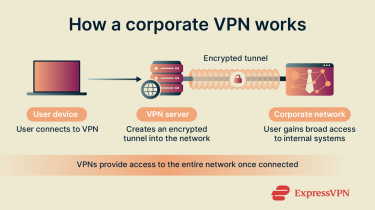
When an employee signs in through the VPN client, the software verifies who they are, establishes an encrypted connection, and routes their traffic through a protected tunnel. Here’s how the process unfolds:
- Connection request: The employee opens the VPN client and signs in. The client sends login details to the company’s VPN server.
- Identity verification: The server checks the credentials, often with two-factor authentication (2FA), to confirm the employee is allowed to connect.
- Secure tunnel created: Once approved, the client and server establish an encrypted tunnel. All traffic passing through it is protected.
- Data transmission: The client encrypts outgoing data before sending it through the tunnel. The server decrypts the data and forwards it into the internal network.
- Return traffic secured: Any data coming back from the internal network is encrypted by the server and then decrypted by the client on the employee’s device.
Advantages and limitations of corporate VPNs
Corporate VPNs remain a trusted solution for secure remote access, but they come with certain trade-offs.
Benefits of corporate VPNs
- Enables secure remote access: Employees can safely access internal resources, applications, and files remotely, which is ideal for flexible and hybrid work arrangements.
- Supports multiple devices: VPN clients run on most operating systems, including Windows, macOS, Android, and iOS, as well as various hardware, making deployment across a diverse workforce easier.
- Cost-effective: For small to mid-sized teams, corporate VPNs provide a secure, reliable connection without the higher costs associated with more complex security frameworks.
- Protects data: All online traffic is encrypted, safeguarding sensitive company information from cyber threats, unauthorized access, or accidental leaks.
- Centralized network control: All traffic flows through the company’s VPN gateway, allowing IT teams to enforce firewalls, access policies, and threat detection consistently.
Weaknesses and risks
- Single-point routing: Many corporate VPNs route all employee traffic through a central server or gateway. While this protects data, it can create bottlenecks and impact connection speed if multiple users are online simultaneously.
- Broad network exposure: Once connected, users may gain access to more internal systems than they actually need, increasing risk if an account is compromised.
- Scaling and management overhead: Growing teams often require additional gateways, configuration, and ongoing administration to maintain reliable access.
- Privacy considerations: Some corporate VPNs may log certain usage information for auditing or troubleshooting. Organizations should define clear policies to balance security and privacy.
- Geographic restrictions: In some regions, VPN detection and blocking are common, so organizations with remote teams in those countries may need alternative secure access methods.
While these issues exist, they can often be managed with proper configuration, user training, and consistent policy enforcement.
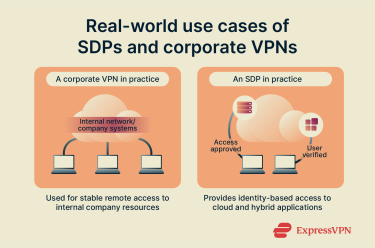
Real-world use cases of SDPs and corporate VPNs
SDPs and corporate VPNs are often used in different ways depending on an organization’s size, structure, and security goals.
When organizations choose an SDP
Organizations that adopt SDP often have complex networks, multiple cloud environments, or a large remote workforce. SDP allows them to control access based on user identity rather than network location, making it ideal for companies embracing the zero-trust model. For example:
- Cloud-heavy environments: Businesses using platforms like AWS, Azure, or Google Cloud benefit from SDP’s ability to manage access across different cloud systems.
- Distributed teams: Companies with global or hybrid teams use SDP to provide secure, direct access to only the apps employees need.
- High-security industries: Financial institutions or healthcare providers adopt SDP to meet strict compliance standards and prevent unauthorized access.
- Growth-focused companies: Fast-growing organizations choose SDP for its scalability and ability to adapt as new users and devices join the network.
When organizations choose a corporate VPN
Corporate VPNs remain a practical and trusted choice for many businesses, especially those with simpler IT environments or a smaller remote workforce. They offer reliable encrypted connections without requiring major infrastructure changes. Common use cases include:
- Remote work access: Employees connect securely to internal networks from home or while traveling.
- Small and mid-sized companies: These organizations often prefer corporate VPNs for their affordability and straightforward setup.
- Internal network protection: Businesses use VPNs to shield sensitive data from external networks or unsecured Wi-Fi.
- Temporary or project-based teams: Contractors or short-term staff can safely access company resources without long-term access management setups.
SDP vs. corporate VPN: Key differences and comparison
While both solutions support secure remote access, the way they handle trust, connectivity, and network exposure differs. These differences shape how each performs in real environments, affect day-to-day administration, and influence the overall user experience. The sections below break down these distinctions in more detail.
Security features
SDP’s security is built on a zero-trust model. Every connection is authenticated and encrypted individually, which limits the impact of compromised credentials and prevents lateral movement within the environment. Because applications stay hidden until access is granted, outsiders can’t even detect what systems exist.
That said, many SDP implementations rely on endpoint agents to assess device posture, and these agents must be secured. If an agent is compromised, an attacker could impersonate a trusted device.
VPNs, by contrast, secure the connection between a user and the network, protecting data from interception on public or untrusted networks This broad access, however, can increase the attack surface if a device is compromised.
Performance and reliability
SDP connects users directly to the applications they need, so traffic doesn’t have to pass through a central gateway. This direct approach can improve speed and reduce congestion, especially for distributed teams. Because many SDP platforms are cloud-native, performance often scales automatically with demand.
Corporate VPNs, on the other hand, typically route traffic through centralized servers. This setup is reliable and widely supported, but performance can drop when many users connect at the same time. VPN gateways can become bottlenecks, particularly during peak remote access periods or when traffic is routed to cloud applications.
Ease of use and management
With SDP, policies link user roles directly to specific resources. This makes it easy for administrators to update access as departments change or new applications are added. Centralized visibility also simplifies audits and reduces manual configuration.
Corporate VPNs are usually straightforward for employees, but managing segmented access often involves juggling firewall, network, and identity settings. As the environment grows, keeping least-privilege access can become complex and time-consuming.
Support for remote work and BYOD
SDP is designed for distributed setups. It checks both user identity and device posture without assuming a trusted network, making it well suited for remote teams and personal devices.
Corporate VPNs let remote devices connect as if they were inside the internal network. While this enables flexible access, in a bring your own device (BYOD) scenario, a personal device with weak security, outdated software, or malware can become an entry point into the broader corporate network.
Comparison table: SDP vs. a corporate VPN (side-by-side)
This side-by-side table highlights the key differences between SDP and corporate VPNs to quickly compare access control, security, performance, and support for remote work.
| Feature | SDP | Corporate VPN |
| Access control | Lets users reach only the specific apps they’re approved for | Gives users access to the wider company network once connected |
| Security | Keeps systems hidden and checks identity before every connection | Encrypts your connection but trusts you once you’re inside |
| Performance | Speeds depend on where the nearest cloud gateway is | Reliable but can bottleneck traffic unless deployed in a distributed setup |
| Ease of use | Takes more setup but easier to manage at scale | Simple to connect, but needs more IT upkeep |
| Remote work and BYOD | Built for remote and mixed devices, verifies each one | Works anywhere, but offers less control over personal devices |
Can SDP and corporate VPNs work together?
Yes, SDP and corporate VPNs can complement each other. Organizations sometimes use both to meet specific security needs, balance user experience, and cover a wider range of devices, locations, and applications.
Integration strategies
Organizations can integrate SDP and corporate VPNs in several ways:
- Layered access: Use SDP for cloud and critical applications while maintaining corporate VPN for general internal network access.
- Conditional routing: Direct sensitive traffic through SDP, with less sensitive or legacy systems accessed via corporate VPN.
- Unified management: Some security platforms allow administrators to manage both SDP and corporate VPN access from a single dashboard, simplifying policy enforcement.
Hybrid approaches in practice
Many companies adopt hybrid approaches leveraging both corporate VPN and SDP solutions to balance security and flexibility in practice:
- Remote work access: Teams working from home may use a corporate VPN to reach internal systems while relying on an SDP to access cloud apps that require tighter, identity-based controls.
- Department-specific permissions: Companies can segment access by role or department. The VPN handles broad network access, and the SDP applies finer rules that limit who can reach sensitive applications.
Closing security gaps with combined solutions
Using SDP alongside a corporate VPN helps organizations tighten access without redesigning their entire network at once. The VPN remains the entry point, but SDP adds controls that limit what becomes visible or reachable after the connection is established.
This reduces unnecessary network exposure, contains the impact of compromised devices or accounts, and lets teams adopt zero trust principles gradually. For many organizations, this blended model offers a practical balance, where they keep familiar workflows in place while strengthening protection around the resources that matter most.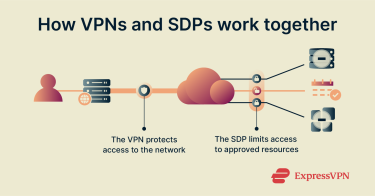
Broader context of network security
Network security is no longer based on the idea that everything inside a company’s network is safe. Remote work, cloud adoption, and mobile devices mean employees now connect remotely, not just from inside an office. This shift moves security away from protecting a single network perimeter and toward controlling who and what device is accessing resources.
Corporate VPNs and SDP both play roles in this new environment by reflecting the broader move from location-based trust (“you’re inside the network, so you’re trusted”) to identity-based trust (“you’re authenticated and approved, so you’re trusted”). Still, they’re just one part of a much larger shift in how networks are designed and protected.
To understand where these tools fit today and where things are heading, it helps to look at the frameworks shaping modern security strategy, including SASE, zero trust, and the evolving role of traditional network technologies.
The rise of Secure Access Service Edge (SASE)
SASE is a modern framework that combines networking and security into a cloud-delivered service. It allows organizations to manage access, enforce policies, and protect data regardless of where employees are located.
SDP is often a core component of SASE in providing identity-based access to applications. Corporate VPNs can also fit into a SASE model to offer secure connectivity for employees to reach internal resources as part of a comprehensive security strategy.
SDP and zero-trust architecture
SDP is one of the clearest practical implementations of zero-trust architecture by assuming no user or device is trusted by default. It verifies identity and context before granting access, limiting permissions strictly to authorized resources. The "deny-all" stance until users or devices are authenticated and authorized makes the network invisible to unauthorized actors.
This approach significantly reduces risks of data breaches and insider threats by rendering the network effectively invisible to unauthorized users. Organizations adopting SDP can implement a zero-trust cloud gradually, applying strict access rules while maintaining productivity.
Can corporate VPNs be part of a zero trust model?
Yes, corporate VPNs can play a role in a zero trust framework. While traditional VPNs give broader network access security, they can be configured with policies, MFA, and segmentation to align with zero-trust principles. Many organizations use corporate VPNs alongside SDP or other security tools to create layered zero-trust data protection systems and ensure employees connect securely to only the resources they need.
The future of network security
Network security is moving away from perimeter-centric thinking and toward models that focus on identity, context, and granular access. Cloud adoption, remote work, and device diversity are pushing organizations toward architectures that adapt dynamically rather than rely on static boundaries.
SDP, SASE, and corporate VPNs will likely coexist as part of the large model, providing different layers of protection in future solutions that focus on identity verification, automated access control, and seamless integration across devices and cloud services. Organizations that combine these technologies strategically will be better positioned to protect sensitive data, support flexible work models, and respond quickly to emerging threats.
FAQ: Common questions about SDP and VPNs
Is SDP better than VPNs?
Software-defined perimeter (SDP) solutions aren’t strictly better than VPNs, but they offer a different approach to security. While corporate VPNs provide encrypted tunnels for general network access, SDP focuses on identity-based, zero-trust access to specific resources. Organizations with cloud-heavy environments or distributed teams often benefit more from SDP, while VPNs remain reliable for general remote access and simpler IT setups.
Is SD-WAN better than VPNs?
A software-defined wide area network (SD-WAN) serves a different purpose than corporate VPNs and isn’t inherently better. SD-WAN is designed to optimize network performance by directing traffic across multiple internet connections efficiently, while VPNs focus on securing traffic and providing private access. Many organizations use SD-WAN together with VPNs to improve both connectivity and security for remote offices or distributed teams.
What does SDP mean in networking?
A software-defined perimeter (SDP) is a security framework that controls access to network resources based on identity and context. It hides internal systems from unauthorized users, granting access only to verified individuals or devices. This zero trust approach helps prevent data breaches and limits the impact of compromised credentials or devices.
Can SASE replace VPNs?
Secure Access Service Edge (SASE) can reduce reliance on corporate VPNs, but it doesn’t necessarily replace them entirely. SASE combines networking and security in a cloud-delivered platform, incorporating software-defined perimeter (SDP) principles and secure connectivity. Many organizations continue using corporate VPNs alongside SASE to provide flexible access to internal networks while adopting zero trust security for cloud applications.
How do I choose the right solution for my organization?
Choosing between software-defined perimeter (SDP) solutions and corporate VPNs depends on your network needs and security goals. Consider factors like the size of your remote workforce, cloud adoption, compliance requirements, and desired access control granularity. Organizations with distributed teams and high-value data often benefit from SDP, while smaller teams or simpler networks may find corporate VPNs sufficient.
What regulations affect the use of SDP or VPN?
Several regulations govern how organizations implement network access solutions to protect data privacy. These include the General Data Protection Regulation (GDPR) in Europe, the Health Insurance Portability and Accountability Act (HIPAA) in healthcare, and the Payment Card Industry Data Security Standard (PCI DSS) for payment data. Compliance requires secure access controls, monitoring, and data protection measures, which both software-defined perimeter (SDP) solutions and corporate VPNs can help support depending on implementation.
What costs are involved in switching from VPN to SDP?
Switching from corporate VPNs to software-defined perimeter (SDP) solutions involves setup, licensing, and operational costs. Organizations may need to update infrastructure, train IT staff, and purchase SDP licenses or subscriptions. While upfront investment can be higher than maintaining a corporate VPN, many businesses find granular access control and scalability worth the cost.
Take the first step to protect yourself online. Try ExpressVPN risk-free.
Get ExpressVPN