How to permanently delete your Temu account


Temu is a massively popular e-commerce platform with hundreds of millions of active monthly users worldwide. However, as it grows in popularity, questions and discussions around cybersecurity, data privacy, and transparency have become more common.
Some users are deciding that the potential risks outweigh the benefits and are deleting their Temu accounts altogether. If you’ve decided to delete your Temu account, this guide walks you through the process and what to expect.
What you need to know before deleting your Temu account
Deleting your Temu account is permanent. Once you submit a deletion request, your account will typically be deleted within seven business days. If you change your mind, you can log in and cancel the deletion if it hasn’t yet been actioned. Once the request is finalized, it can’t be undone, so be sure you don't want the platform anymore before you submit a request.
Why people are deleting Temu
The primary reasons users might delete their Temu accounts are privacy concerns and frustrations with the shopping experience. Temu’s Privacy Policy states that it collects a wide range of personal information, including device data, usage patterns, and location, as part of how its service operates.
However, several state attorneys general have filed lawsuits alleging that the app’s data collection practices exceed what’s necessary for an online marketplace and may be misleading to users, claims that Temu has not admitted and that remain subject to legal proceedings. Arizona is the most recent state to file a lawsuit against Temu and its parent company, PDD Holdings Inc.
Temu has also been subject to many customer complaints about product quality and poor customer service. Many products are from lesser-known third-party sellers, which can lead to quality variations, and many customers complain about cheap imitations or items that don’t match their descriptions.
Temu does offer free refunds on most eligible items within a 90-day return window, with some exceptions. However, many customer reviews report difficulty reaching customer service or resolving issues. It’s also worth noting that Temu is not accredited by the Better Business Bureau (BBB), though BBB accreditation is optional and not a requirement for operating an e-commerce platform.
What happens to your data after deletion?
Temu does not erase all data immediately after an account deletion request. Here’s what you need to know based on Temu’s Privacy Policy and related disclosures:
- Your account is not deleted instantly: When you submit a deletion request, Temu may take up to seven business days to process it. However, after this period, your account will be permanently deleted and cannot be recovered.
- Temu may not delete all your data: Temu’s Privacy Policy states that some information may be retained as required by applicable laws, such as for tax, fraud-prevention, or recordkeeping purposes.
- You may have a “right to erasure”: Depending on your location, you may have a legal right to erasure under privacy laws such as the General Data Protection (GDPR) Regulation in the EU, the California Privacy Rights Act (CPRA) in California, and similar privacy laws in certain other U.S. states. These laws allow you to request the deletion of your personal information. Still, they permit companies to retain data where necessary for legal or regulatory requirements.
- Your data may be transferred to other countries: Because Temu operates globally (storing user data in its cloud infrastructure), some of your data may be processed by service providers in different countries. Its policy states that data may be deleted or anonymized when no longer required, but it doesn’t detail how third-party providers handle every copy of that information.
Can you reactivate a deleted Temu account?
You can cancel your deletion request if you take action before Temu has acted on it (which happens within seven business days of you making the request). Once the deletion has been finalized, there’s no way to reactivate your account.
You’ll be automatically logged out of your account as soon as you request deletion. You can try to log back in to cancel the deletion if you’re still within the seven-day period, and you can also contact Temu support for assistance within that timeframe.
Does deleting the app also delete the account?
No, deleting the Temu app won’t delete your account or your account data. It will only remove the app from your device. You need to go through the Temu account deletion process in the Temu app or website, not just uninstall the app.
Important steps to protect your privacy before deleting
You may not be able to control every aspect of how Temu handles your data, but you can take steps to protect your privacy before deleting your account. Simple things like removing personal details, deleting payment methods, clearing stored data, and revoking permissions can give you more control over your digital footprint.
How to download or back up your account data (if needed)
Before deleting your account, you may want to save any information you might need later. Temu lets you request a copy of the personal information associated with your account. Here's how to do it:
- Open the Temu app or website and go to You > Settings.

- Select Privacy.
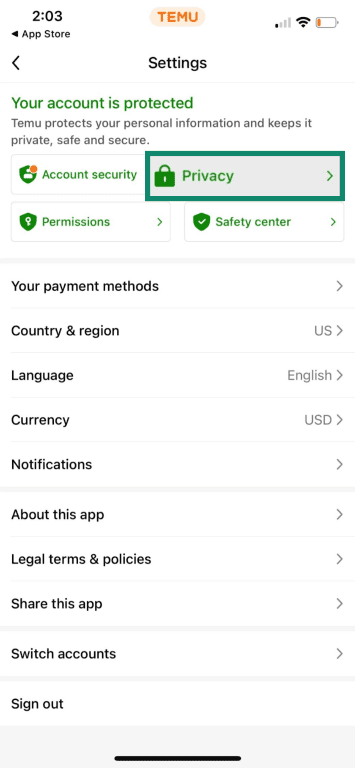
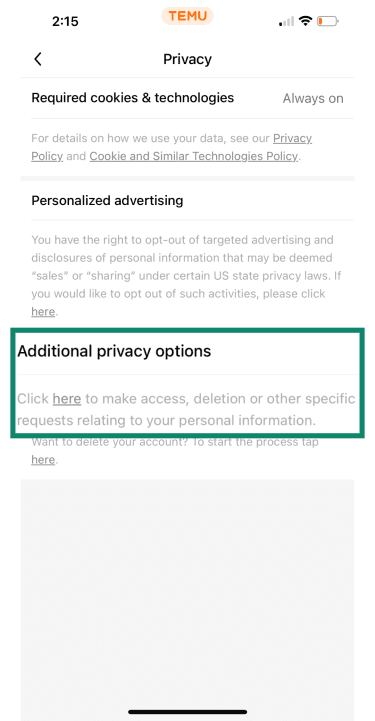
- You’ll see a section titled Additional privacy options. Click the link.
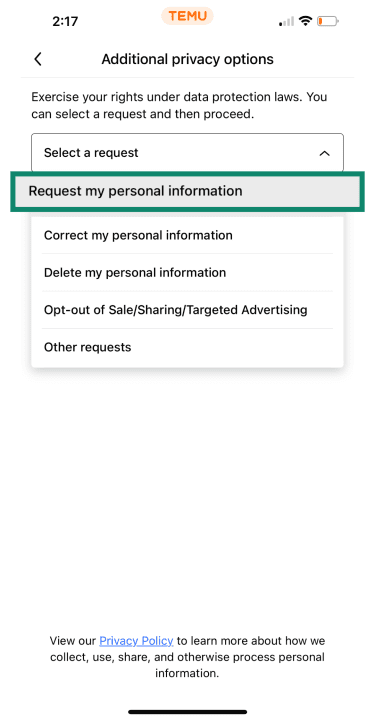
- Select the option Request my personal information, then follow the prompts to verify your request.
- Temu will show that your request has been submitted successfully and send you a confirmation email.
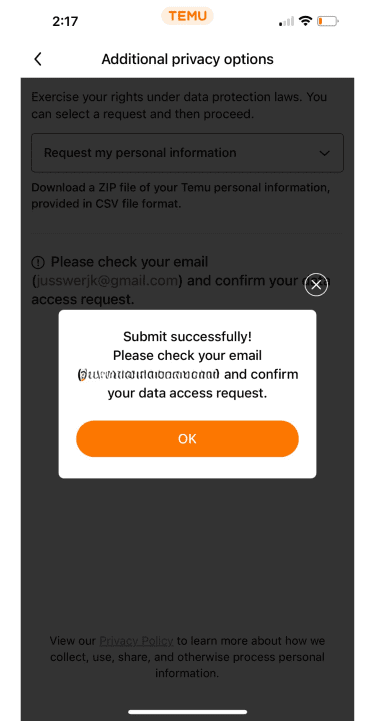
Temu will then email you a zip file of your data for download and saving.
Note: The company doesn’t specify how long it takes for this file to arrive, and the information provided may depend on your location and applicable privacy laws.
Remove your personal and payment information
Before you delete your Temu account, it’s a good idea to take steps to minimize the amount of sensitive data the service retains. You can manually remove stored payment methods and personal details, and revoke device permissions in your phone’s settings.
Temu’s Privacy Policy notes that some information may still be kept for legal, fraud-prevention, or compliance purposes, but removing non-essential details can limit what remains associated with your account after closure.
How to remove saved payment methods
Removing saved payment methods from your Temu account only takes a few minutes, but keep in mind that the navigation path may vary depending on your region, app version, or platform.
Here’s how to do it:
- Go to Settings and select Your payment methods.
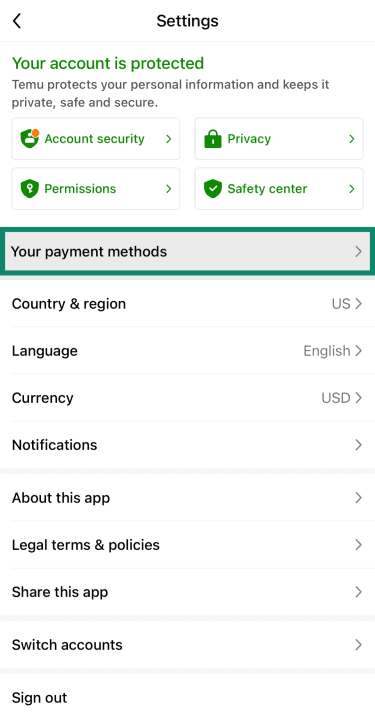
- Find the payment method/s you want to delete.
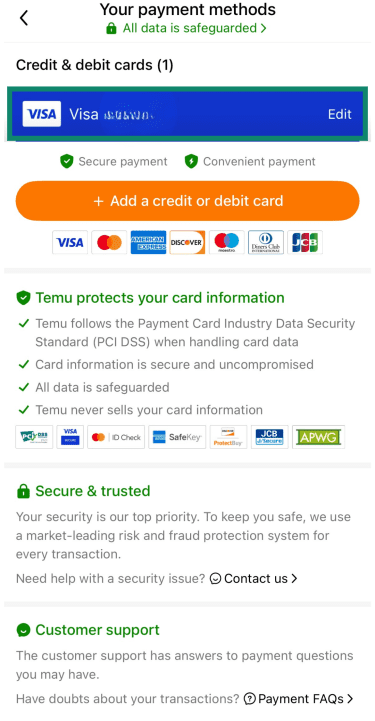
- Select Delete to remove the payment method.
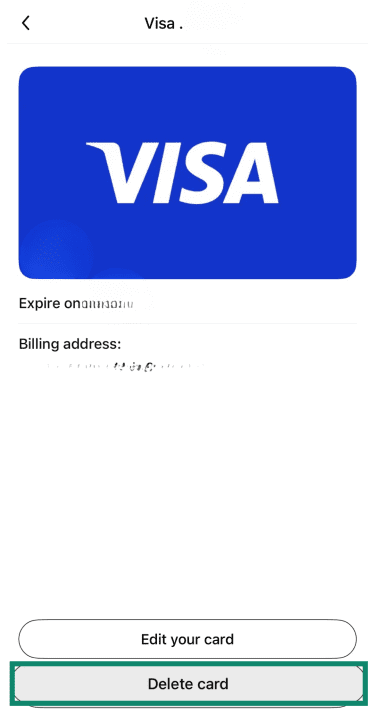
- Confirm the deletion when prompted.
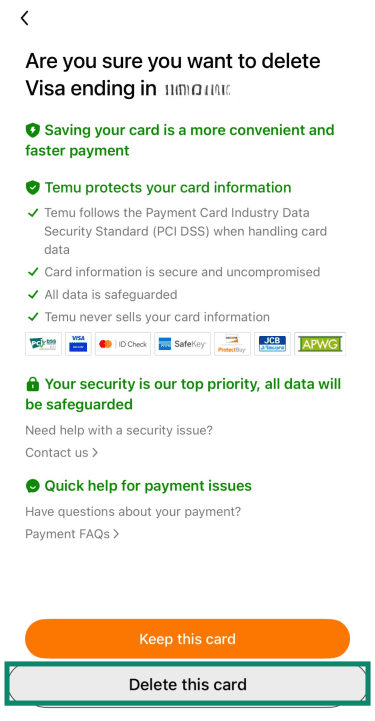
If you can’t remove a payment method because an order is active, wait until all orders are delivered or refunded.
How to remove personal information and adjust permissions
Temu’s privacy settings let you manage how some of your information is used, such as for personalized ads or analytics. Taking a moment to review these options before deleting your account can help reduce the amount of non-essential data the app retains. Here’s how:
- Go to Settings and select Privacy.
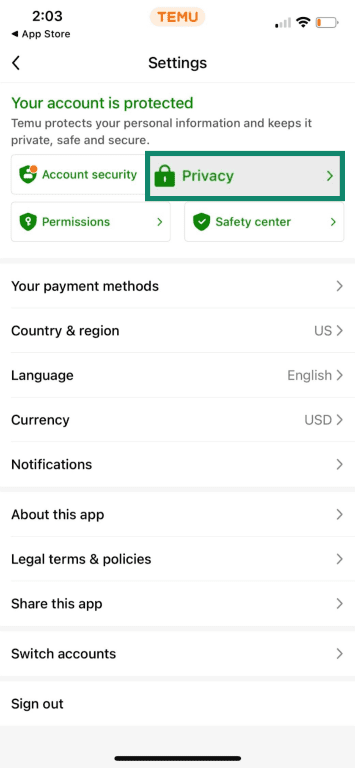
- Click on the section labeled Personalized advertising.
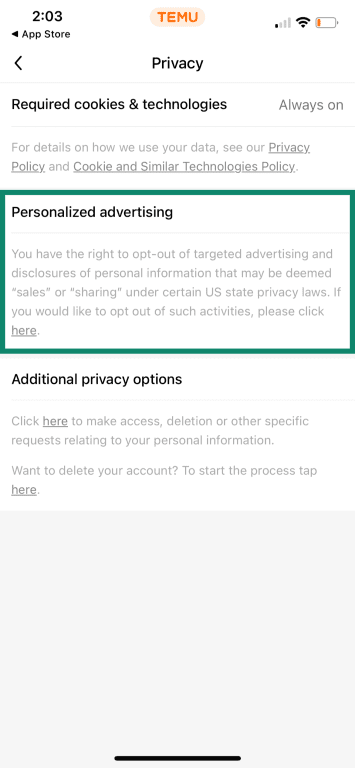
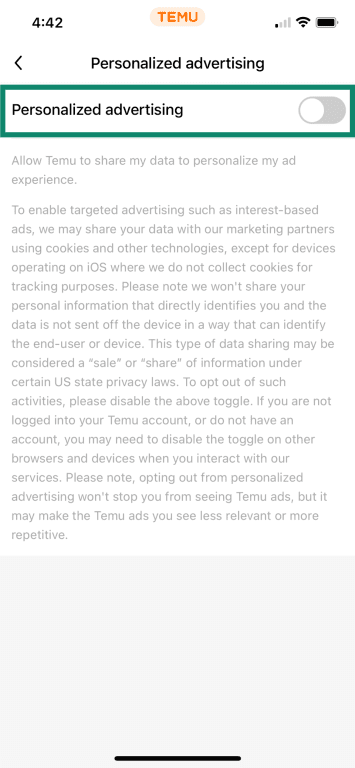
- Toggle the setting off. This limits Temu’s use of your activity for interest-based ads and reduces sharing with certain advertising or analytics partners. It does not turn off all data collection.
- Go back to Settings and select Permissions.
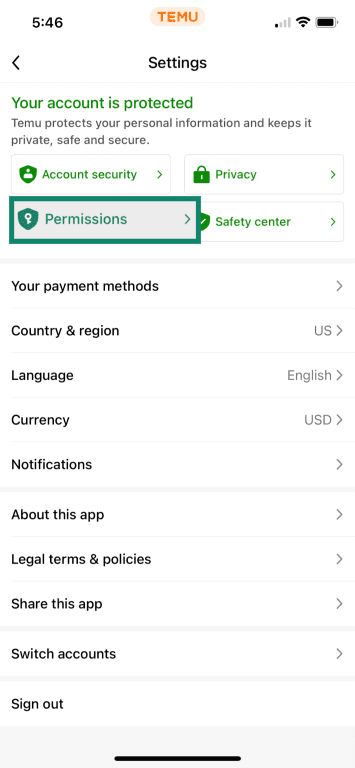
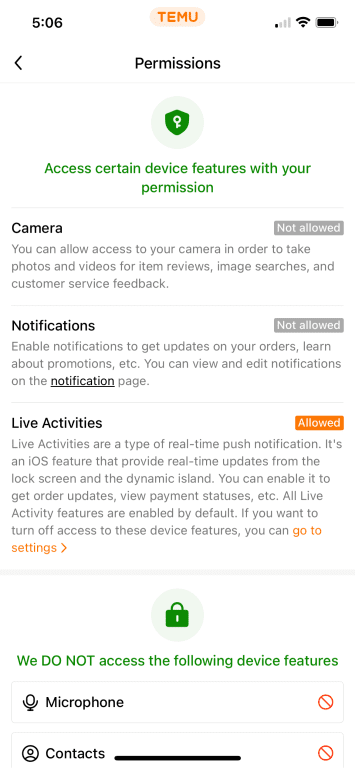
- From there, you can control Temu’s access to your location, camera, microphone, photos/media, contacts, and more.
- Go to You > History.

- You’ll see all your recent activity. Simply find any item/s you want to delete, tap the three dots on the right side, and select Delete.
This removes activity from your account view, but Temu does not currently allow users to delete their order or purchase history through the interface, and past transaction records remain stored on its systems.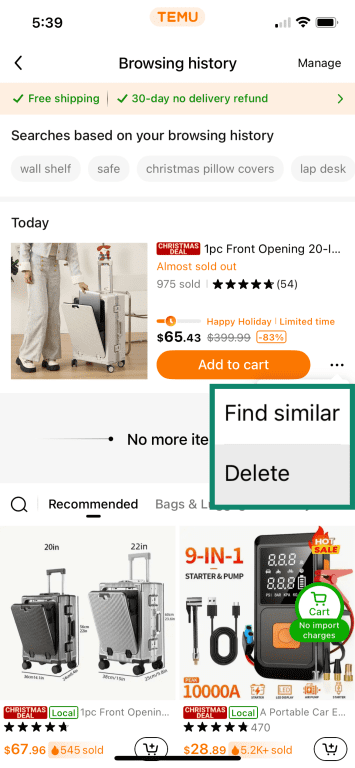
Note: The steps above show you how to manage Temu permissions through your device's app settings on iOS or Android. If you’re using Temu on a desktop browser, you’ll need to review or change permissions for temu.com in your browser’s privacy or site settings menu.
Step-by-step guide to deleting your Temu account
Once you’ve completed the preliminary steps and are sure you want to delete your Temu account, you can get it done in just a few minutes. Here’s how.
How to delete your Temu account on mobile
Deleting your Temu account on mobile is straightforward. The app includes a dedicated option for account deletion, which makes it easy to do without contacting customer support, and the steps are the same on iOS and Android.
Delete your Temu account on iPhone or Android
Follow these simple steps to delete your Temu account on mobile:
- Open Settings and select Account security.
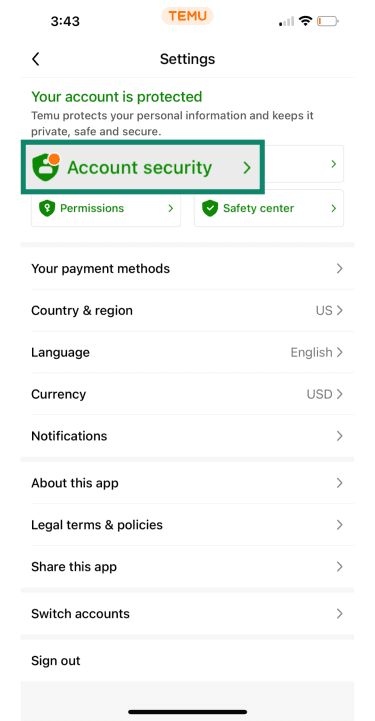
- Tap Delete your Temu account.
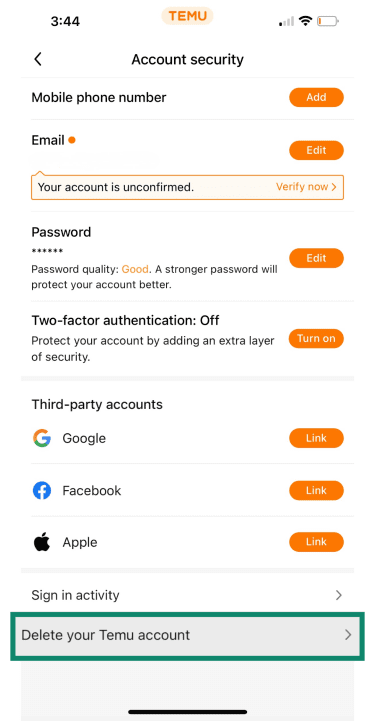
- Follow the prompts to confirm deletion.
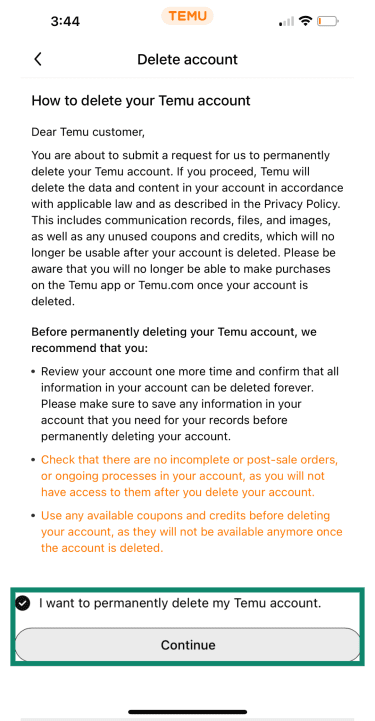
- Select a reason for deletion and tap Continue.
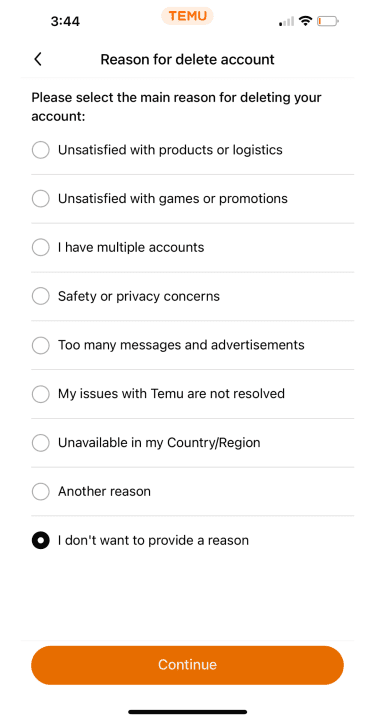
Follow the prompts to confirm your request, and your account will be scheduled for deletion within seven business days.
How to delete your Temu account via the website
Deleting your Temu account on the website is just as easy as on mobile. Here are the steps to follow.
- Log into temu.com, click your profile icon in the top-right corner, and select Your profile.

- Click Account security.
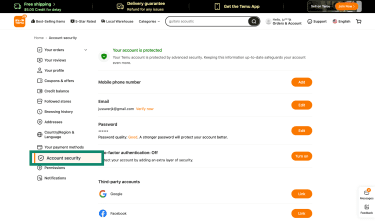
- Scroll to the bottom of the Account security page and click Delete your Temu account.
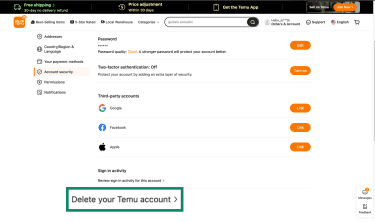
- Verify that you want to delete the account, then click Continue.
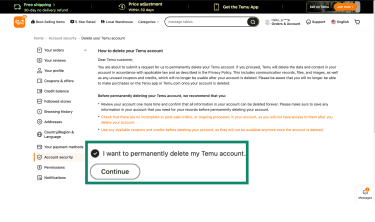
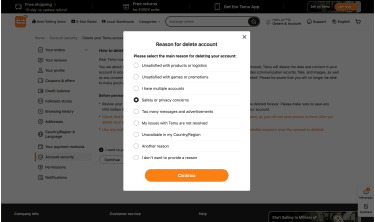
- Select a reason for deletion and click Continue.
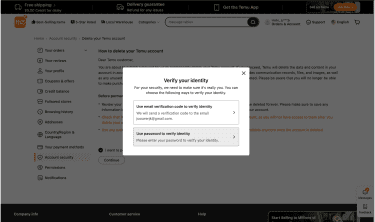
- Follow the prompts to verify your identity. If asked, enter your password or request a verification code via email or phone. Note that the verification steps may vary by region and account configuration (for example, if you have two-step verification enabled).
Should you use a VPN when deleting your Temu account?
Using a virtual private network (VPN) can add an extra layer of privacy if you’re connected to an unsecured or public Wi‑Fi network when you log into Temu to delete your account.
A VPN encrypts your device’s internet traffic and masks your IP address, which makes it much harder for others on the same network to intercept or read your data. This can be particularly useful on public networks where traffic is often unprotected.
The risks of public Wi-Fi
Public Wi‑Fi networks, such as those in coffee shops, airports, hotels, or libraries, often lack proper encryption or authentication, so you need to take extra care when using them, especially if you’re doing something sensitive like logging into and deleting your Temu account.
Here’s a breakdown of some of the risks you could encounter:
- Data interception: Cybercriminals on the same network may be able to capture unencrypted traffic, including login details and personal messages.
- Fake or malicious hotspots: Attackers sometimes set up bogus networks that trick devices into connecting and then capture traffic.
- Man‑in‑the‑middle (MITM) attacks: On unsecured networks, attackers may intercept or redirect data between your device and the server you think you’re communicating with.
- Other threats: These can include malware delivery, spoofed login pages, and session hijacking.
Even though many sites and apps, including Temu, use HTTPS (encrypted connections), network‑level threats are still possible on public Wi‑Fi unless you take extra precautions.
How a VPN can help protect your personal data
While a VPN doesn’t prevent Temu from collecting any data you voluntarily provide while logged in, it can help protect the transmission of your account details and mask some identifying information at the network level.
This is what a VPN does:
- Encrypts your connection: A VPN encrypts data between your device and the VPN server. This reduces the risk of your login credentials, verification codes, and account details from being intercepted while on a public or unsecured Wi-Fi network.
- Masks your IP address: A VPN replaces your real IP address with the VPN server’s IP address. This can help obscure your approximate location based on IP data and reduce IP-based tracking. Just keep in mind that Temru can still determine your location if GPS permissions are enabled, or infer it from your shipping address, phone number, SIM info, or time zone.
- Protects against MITM attacks: By encrypting your traffic, a VPN can make it significantly harder for attackers on unsecured networks to read or tamper with your deletion request as it’s transmitted.
- Reduces tracking and profiling: A VPN hides your IP address and specific network-level details, making it harder for third parties to link activity to your device. However, it doesn’t block all identifiers or prevent platform-level data collection.
FAQ: Common questions about deleting Temu
Will deleting my Temu account cancel my pending orders and refunds?
No, deleting your Temu account doesn’t automatically cancel any pending orders or refund requests. Temu’s documentation doesn’t state that orders will be canceled during account deletion, and its guides recommend resolving active purchases, returns, or refunds before initiating deletion.
How to contact Temu support for account deletion issues?
To contact Temu support for account deletion issues, use in-app support by going to the Support section, selecting Contact us, and starting a live chat to explain your problem. Alternatively, you can submit support requests through the Temu website contact forms and help center.
Can you deactivate a Temu account?
No, Temu doesn’t offer a “deactivate” option. You can only request permanent account deletion. While deletion is pending, your account may appear to be inactive, but it’s not technically “deactivated.”
Take the first step to protect yourself online. Try ExpressVPN risk-free.
Get ExpressVPN